
What is Apache Arrow Flight?
I don’t know what it is about Apache Arrow, that GOAT of data engineering, that snuck in like a weasel through the backdoor, we all woke up one day and found out Arrow is the Atalas of the data world, holding up the systems we depend on and take for granted. One name you might, or might not have heard rattling around is “Apache Arrow Flight” or “Arrow Flight.”
It pops up a little in blogs, talks, and the READMEs of some GitHub repos… I imagine all the vibe-coding Chads just nodding furiously on Zoom calls, like wise old owls who know exactly what’s being talked about. Admit it, you don’t know what Arrow Flight is.
- Apache Arrow Flight is a high-performance data transport framework built on top of Apache Arrow and gRPC that allows applications to move large datasets across networks much faster than traditional technologies like JDBC, ODBC, CSV exports, or REST APIs
The entire premise is taking advantage of the columnar format Arrow, and avoiding the classic data transportation path that has been normalized for a long time.
- Serialize data
- Send it
- Deserialize data
RecordBatches of Arrow data can be sent over the matrix in a “streaming fashion” (in RecordBatches I said) and picked up at the destination already in the format that doesn’t require Deserialization to take place. I mean, if we think of Flight as a sort of protocol for sending and receiving data, its name makes sense.
On the surface, it appears we have two important concepts when we talk about what Arrow Flight is or how to use It.
- Client
- Server
Of course, clients would make requests to an Arrow Flight Server; this is actually done with gRPC, “Google’s popular HTTP/2-based general-purpose RPC library and framework.”
Also, it appears that Arrow Flight departed from the traditional distributed systems architecture, which always means interacting with a single coordinator to make a request. Instead, Arrow Flight Server(s) have multiple endpoints that can work together to fulfill requests and tasks.
This makes data transfer “parallelization” possible.
- This figure from Arrow Flight shows that concept.
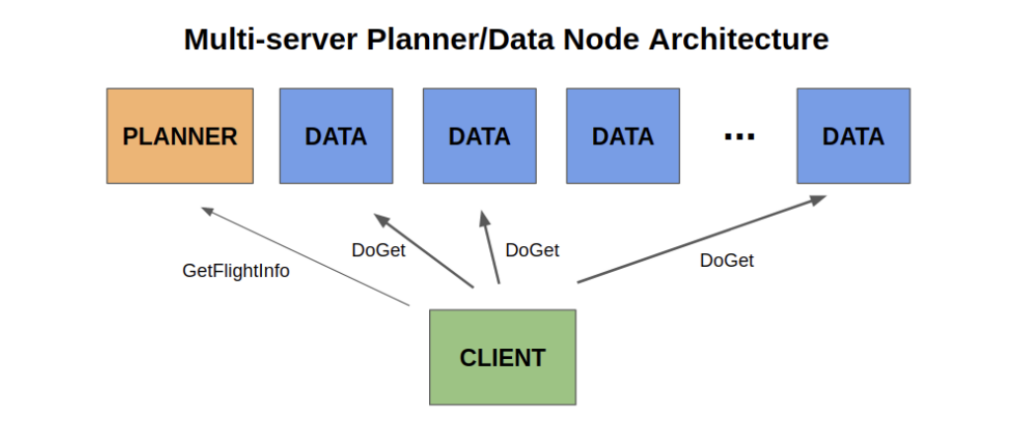
source https://arrow.apache.org/blog/2019/10/13/introducing-arrow-flight/
It seems, from reading much of the Arrow Flight material, that there is an extremely tight coupling between a dataset and an Arrow Flight implementation. Meaning, from what I can tell, Arrow Flight is a tool for building other custom tools and data transport layers. Many of the examples I could find you actually had to implement the methods that an Arrow Flight is designed around, like doGet, doPut, etc.
- I assumed maybe, for the Python Arrow Flight client, this would have been done for you. And maybe it is, it could just be my naivety.
Let us write code and talk about it.
If you know you know, we can only pontificate upon the finer points of Arrow Flight, that we really know nothing about, for so long. At some point, we need to scrape our minds out of the gutter Claude has left it in and write code ourselves to cement in our heads what Arrow Flight is and how we can use it to transport data.
I think to do this, we should do something actually useful and interesting. Let me think, how about …
- Delta Lake
- Python
- Some open source data.
Let’s dump a bunch of Divvy Bike trip dataset stuff into a Delta Lake table on Databricks Unity Catalog. Let’s also pretend we have specific data applications that want to ask questions and get that data. But, we don’t want to have to run Spark, Spark Connect, or Databricks Serverless, or a SQL Warehouse, or anything that has anything to do with Spark.
We want a “light” solution. Spark isn’t known for being fast, after all, it’s been made for big data crunching. We want snappy data over the wire from our Delta Lake table. Arrow Flight sounds like just the tool eh?
Let’s do three things.
Ok, yak yak yak, let’s go to the code. I want to do three things to make all this work. Remember, this is my first time with Arrow Flight, so it’s more of a thought experiment than anything else.
- Convert our CSV bike trip data to a Delta Lake table.
- Create an Arrow Flight Server on top of this Delta Lake dataset.
- Create an Arrow Flight Client to connect to the Server and consume data.
To the coding salt mines.
[dm_code_snippet background=”yes” background-mobile=”yes” slim=”no” line-numbers=”yes” bg-color=”#abb8c3″ theme=”dark” language=”python” wrapped=”no” height=”” copy-text=”Copy Code” copy-confirmed=”Copied”]
import pathlib

import pyarrow as pa
import pyarrow.csv as pacsv
from deltalake import write_deltalake

CSV_PATH = pathlib.Path(__file__).parent / "data" / "202604-divvy-tripdata.csv"
DELTA_PATH = pathlib.Path(__file__).parent / "data" / "delta" / "divvy_trips"


def setup():
    print(f"Reading CSV: {CSV_PATH}")
    table = pacsv.read_csv(CSV_PATH)

    # pyarrow CSV reader infers timestamps as ns; deltalake requires us precision
    new_schema = pa.schema([
        field.with_type(pa.timestamp("us")) if pa.types.is_timestamp(field.type) else field
        for field in table.schema
    ])
    table = table.cast(new_schema)

    print(f"Writing {len(table):,} rows to {DELTA_PATH}")
    write_deltalake(str(DELTA_PATH), table, mode="overwrite")
    print("Delta table ready.")
[/dm_code_snippet]
Ok, so we have our Delta Table from our CSV file. Next, this is where we will start learning more about Arrow Flight, the Server that will sit on top of this dataset and provide it to Clients, needs to be built.
[dm_code_snippet background=”yes” background-mobile=”yes” slim=”no” line-numbers=”yes” bg-color=”#abb8c3″ theme=”dark” language=”python” wrapped=”no” height=”” copy-text=”Copy Code” copy-confirmed=”Copied”]
import pathlib

import pyarrow as pa
import pyarrow.flight as fl
from deltalake import DeltaTable

DELTA_PATH = pathlib.Path(__file__).parent / "data" / "delta" / "divvy_trips"
DATASET_NAME = "divvy_trips"
TICKET_BYTES = DATASET_NAME.encode("utf-8")


class DivvyFlightServer(fl.FlightServerBase):

    def __init__(self, host="localhost", port=5005, **kwargs):
        super().__init__(f"grpc://{host}:{port}", **kwargs)
        self._delta_path = str(DELTA_PATH)

    def _open_dataset(self):
        return DeltaTable(self._delta_path).to_pyarrow_dataset()

    def list_flights(self, context, criteria):
        dataset = self._open_dataset()
        descriptor = fl.FlightDescriptor.for_path(DATASET_NAME)
        ticket = fl.Ticket(TICKET_BYTES)
        endpoint = fl.FlightEndpoint(ticket, [])
        yield fl.FlightInfo(
            dataset.schema,
            descriptor,
            endpoints=[endpoint],
            total_records=-1,
            total_bytes=-1,
        )

    def get_flight_info(self, context, descriptor):
        dataset = self._open_dataset()
        ticket = fl.Ticket(TICKET_BYTES)
        endpoint = fl.FlightEndpoint(ticket, [])
        return fl.FlightInfo(
            dataset.schema,
            descriptor,
            endpoints=[endpoint],
            total_records=-1,
            total_bytes=-1,
        )

    def do_get(self, context, ticket: fl.Ticket):
        dataset_name = ticket.ticket.decode("utf-8")
        if dataset_name != DATASET_NAME:
            raise fl.FlightServerError(f"Unknown dataset: {dataset_name!r}")

        dataset = self._open_dataset()
        schema = dataset.schema

        def batch_generator():
            for batch in dataset.scanner(batch_size=65_536).to_batches():
                yield batch

        return fl.GeneratorStream(schema, batch_generator())


def serve(host="localhost", port=5005):
    server = DivvyFlightServer(host=host, port=port)
    print(f"Flight server listening on grpc://{host}:{port}")
    print("Press Ctrl+C to stop.")
    server.serve()
[/dm_code_snippet]
Arrow Flight server breakdown:
– Protocol layer — pyarrow.flight.FlightServerBase handles all gRPC plumbing. You subclass it and implement 3 methods.
Three required RPC methods:
- list_flights – Client discovery: “What datasets exist?” Returns FlightInfo per dataset
-
get_flight_info – Client asks about specific dataset — returns schema + endpoint location
-
do_get – Actual data transfer — streams Arrow record batches to client
Something that was a little confusing to me at first was the idea of a Ticket. Clearly central to the implementation and frequently mentioned in the docs. Ticket = opaque pointer to data. Client says, “I want this data” without knowing WHERE or how the server stores it. The server encodes whatever it needs into bytes and hands it to the client as a Ticket. The client passes it back verbatim on do_get.
So it’s up to the programmer and designer writing the Arrow Flight Server on top of the dataset (s) to decide which part of the dataset(s) constitutes a ticket. It would probably be different with every dataset and, more importantly, the use case. Maybe a ticket could contain a user-given specific partition of the dataset.
Example.
[dm_code_snippet background=”yes” background-mobile=”yes” slim=”no” line-numbers=”yes” bg-color=”#abb8c3″ theme=”dark” language=”python” wrapped=”no” height=”” copy-text=”Copy Code” copy-confirmed=”Copied”]
ticket = fl.Ticket(b"divvy_trips/year=2024/month=06")

Then in do_get:
def do_get(self, context, ticket):
      path = ticket.ticket.decode("utf-8")
      # parse out partition filters, scan only that slice
      dataset = self._open_dataset()
      return fl.GeneratorStream(schema, dataset.scanner(
          filter=ds.field("year") == 2024
      ).to_batches())
[/dm_code_snippet]
Anyway, let’s get moving on to the other stuff.
Data flow:
1. Client calls list_flights or get_flight_info → gets back a Ticket (opaque bytes = dataset name)
2. Client calls do_get(ticket) → server opens Delta table, scans it, streams batches
Key objects:
– FlightDescriptor — names the dataset (path-style here)
– FlightEndpoint(ticket, []) — ticket + server locations (empty = “come back to me”)
– FlightInfo — schema + endpoints + record/byte counts (-1 = unknown)
– GeneratorStream(schema, generator) — wraps a Python generator into Arrow Flight streaming protocol
Delta → Arrow bridge: DeltaTable.to_pyarrow_dataset() gives a PyArrow Dataset. Then .scanner(batch_size=65_536).to_batches() reads Parquet files in 64k-row chunks — no full load into memory.
Transport: gRPC under the hood, bound to grpc://localhost:5005.
Well, we’ve beaten the dead horse of the Arrow Flight Server to death by now, let’s move on to the Client implementation.
Let’s talk about the client code.
The Client Flight Arrow code is less interesting; the Server is where most of the magic would happen, depending on the dataset and its use case, and on how Clients would want to consume it. We can just create a simple Client and display some general info about our Delta Table, which sits behind a Flight Server.
[dm_code_snippet background=”yes” background-mobile=”yes” slim=”no” line-numbers=”yes” bg-color=”#abb8c3″ theme=”dark” language=”python” wrapped=”no” height=”” copy-text=”Copy Code” copy-confirmed=”Copied”]
import pyarrow.flight as fl


def run_client(host="localhost", port=5005):
    client = fl.connect(f"grpc://{host}:{port}")

    print("Available flights:")
    flights = list(client.list_flights())
    if not flights:
        print("  (none — run 'python main.py setup' first)")
        return

    for info in flights:
        path = [p.decode("utf-8") for p in info.descriptor.path]
        print(f"  path={path}  schema_fields={len(info.schema)}")

    info = flights[0]
    ticket = info.endpoints[0].ticket
    print(f"\nFetching '{ticket.ticket.decode()}' ...")

    reader = client.do_get(ticket)
    table = reader.read_all()

    print(f"\nTotal rows: {len(table):,}")

    print("\nCount by rideable_type:")
    for item in table.column("rideable_type").value_counts():
        d = item.as_py()
        print(f"  {d['values']}: {d['counts']:,}")

    print("\nCount by member_casual:")
    for item in table.column("member_casual").value_counts():
        d = item.as_py()
        print(f"  {d['values']}: {d['counts']:,}")
[/dm_code_snippet]
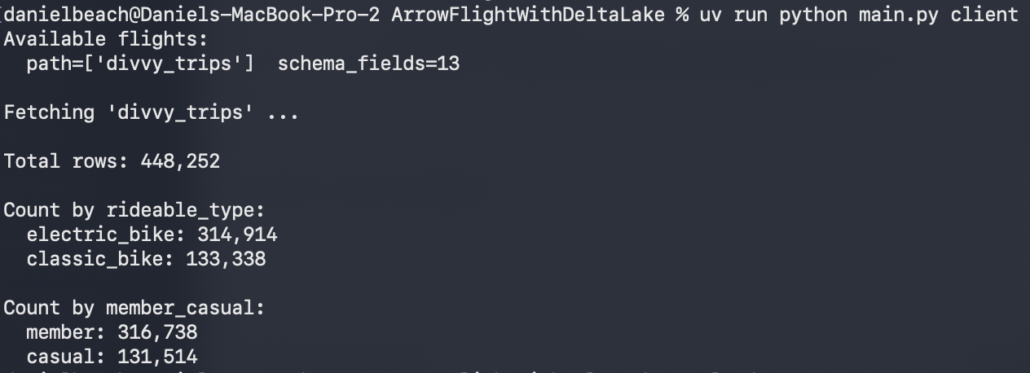
There you can see the whole output, of course I had to start the Arrow Flight Server in another terminal. I put all this code on GitHub, so feel free to check it out yourself.
Thinking about Arrow Flight
I can now see why I’ve only run into mumblings and rumblings about Arrow Flight; it’s a little bit of a hidden gem, probably designed mostly for tool builders, buildings of custom data applications, and as a backbone transport layer for other data tooling. Seems hard to imagine data teams using Flight on a day-to-day basis, again, unless they are building some very specific high-performance data “thingy” where Arrow Flight fits in.
Hey, that doesn’t mean it’s pretty sweet, cool, and powerful. Obviously, it is.
We barely scratched the surface, and it’s clear that many people spent a lot of time on Arrow Flight, making it a top-tier tool capable of handling large-scale use cases. I can see how such a tool would be a great fit for Agentic applications that need fast and snappy access to tabular datasets. I guess they wouldn’t have to be tabular, but you know what I mean.
I’ve built plenty of Agentic AI applications that rely heavily on data, and I’ve used tools like Spark Connect to bridge that gap to the Lake House. That’s heavy, requires a running cluster of some sort, blah, blah. Well, I guess Arrow Flight requires a Server too ehh? Haha!
Either way, high-performance Arrow data on demand, heck, there is a million use cases for that.

